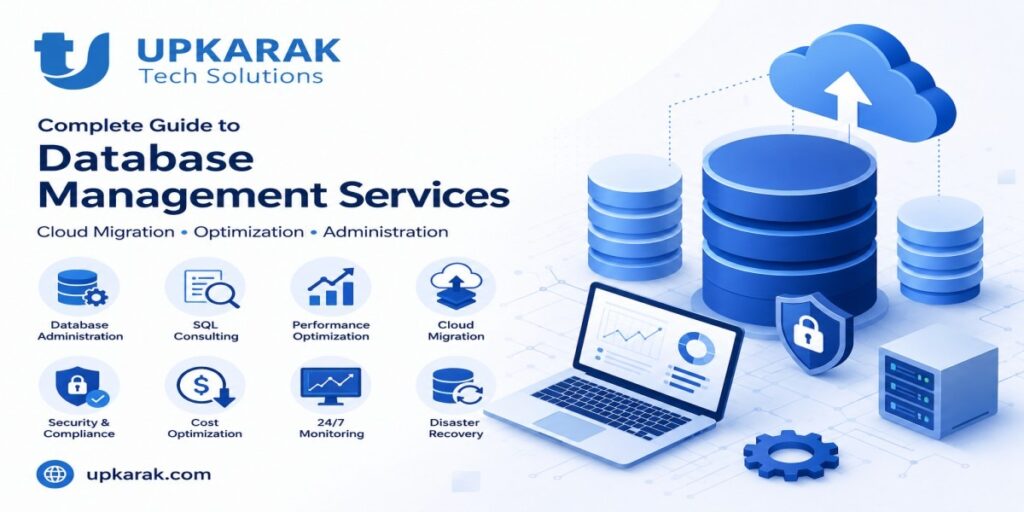
Startups scaling SaaS products need database architecture designed for growth from inception. SQL database consulting prevents costly redesigns later. Managed database services reduce operational burden by 40-60%. Cloud database migration enables global scalability without infrastructure investment. Average SaaS startup spends ₹15-40 lakhs annually on database infrastructure and management. Working with experienced database architects during product development prevents performance bottlenecks affecting 30-50% of production issues in growing companies.
Why Database Architecture Decisions Made Today Determine Your SaaS Product’s Success Tomorrow
Most SaaS startups fail not because of product ideas but because of technical decisions made early that don’t scale. Database architecture is the most critical of these decisions—chosen wrong, it creates exponential problems as users grow.
The Database Architecture Crisis Every Growing SaaS Faces
Problem 1: Wrong database choice early Startups choose PostgreSQL, MySQL, or MongoDB based on tutorial familiarity rather than application needs. This worked at 1,000 users. At 100,000 users, queries that took 100ms now take 10 seconds. Rewriting for a different database means rewriting application logic, migrations, and months of delay.
Problem 2: Zero performance optimization Early-stage teams skip indexing, query optimization, and schema design. Application works fine at launch. At 10x user growth, database becomes bottleneck. You can’t hire developers fast enough to fix performance issues spreading across application.
Problem 3: Security gaps in database access Early startups use single database user, skip encryption, and put API keys in environment files. At Series A fundraising, security audit finds critical vulnerabilities. Fixing requires application refactor and user communication about potential exposure.
Problem 4: Monolithic database architecture Single database handles everything: user auth, transactions, analytics, logging. At scale, heavy analytics queries lock transaction tables. Business-critical operations slow down. Separating requires breaking queries, microservices, and months of engineering.
Problem 5: No disaster recovery or backup strategy Startups assume “it won’t happen to us.” One hardware failure, ransomware attack, or accidental deletion costs company everything. Customers churn immediately. You lose months rebuilding.
Why Early Database Architecture Investment Prevents These Problems
Working with experienced database architects early prevents 80% of scaling problems. Costs ₹30-60 lakhs upfront for strategy and architecture but prevents ₹3-10 crore in reengineering later.
Database experts ensure:
- Right database choice for your workload
- Schema design supporting growth to 10M+ users
- Query optimization from day one
- Security architecture preventing breaches
- Backup and disaster recovery strategies
- Performance monitoring systems
- Cost optimization preventing AWS bills from exploding
Database Architecture Decisions: SQL vs NoSQL vs Specialized Databases
Most SaaS startups incorrectly treat this as a binary choice. Reality is more nuanced.
SQL Databases (PostgreSQL, MySQL, MariaDB)
Best for:
- Transactional data (user accounts, payments, orders)
- Relational data (users have posts have comments)
- Complex queries and reporting
- Data consistency requirements
- Structured data
Strengths:
- ACID compliance (data integrity guaranteed)
- Complex joins and aggregations
- Strong consistency guarantees
- Mature ecosystem and tooling
- Proven at massive scale (Stripe, Shopify, Twitter early)
Weaknesses:
- Harder to scale horizontally (sharding complex)
- Schema changes challenging on large tables
- Not ideal for unstructured data
- Vertical scaling limits eventual
Cost at scale:
- 1M users: ₹2-5 lakhs/month
- 10M users: ₹10-25 lakhs/month
- 100M users: ₹50-100+ lakhs/month
Best for SaaS: Core transactional data (users, accounts, billing). Most SaaS uses SQL for core and NoSQL for ancillary.
NoSQL Databases (MongoDB, DynamoDB, Firebase)
Best for:
- Unstructured or semi-structured data
- Rapid schema evolution
- Horizontal scaling requirements
- High write volume
- Flexible document structures
Strengths:
- Easy horizontal scaling
- Flexible schema (rapid development)
- High write throughput
- Simple operations at massive scale
Weaknesses:
- Eventual consistency (not immediate)
- Complex multi-document transactions difficult
- Higher developer error potential
- Harder to query flexibly
- Can get expensive at scale
Cost at scale:
- Highly variable based on usage patterns
- DynamoDB: $1.25/M read units + $6.25/M write units
- MongoDB Atlas: ₹50,000-5,00,000+/month depending on usage
Best for SaaS: Analytics data, activity logs, user preferences, caching layers.
Specialized Databases (Elasticsearch, Redis, TimescaleDB)
Use cases:
- Search: Elasticsearch (product search, full-text)
- Caching: Redis (session storage, rate limiting)
- Time-series: TimescaleDB, InfluxDB (metrics, analytics)
- Graph: Neo4j (recommendation engines, social networks)
Reality: Most mature SaaS uses 3-5 database types: SQL for core data, NoSQL for flexible data, Redis for caching, Elasticsearch for search, TimescaleDB for analytics.
Database Performance: What “Slow Queries” Actually Cost Your SaaS
A 100ms query doesn’t sound bad until you realize the compound impact at scale.
The Math of Slow Queries at Scale
Example: User profile page query taking 100ms
Users | Query Time | Per-Day Queries | Wasted Time/Day | Cost/Year (at $100/hr dev time) |
10,000 | 100ms | 500,000 | 14 hours | ₹50 lakhs |
100,000 | 100ms | 5M | 139 hours | ₹5 crore |
1,000,000 | 100ms | 50M | 1,389 hours (58 days!) | ₹50 crore |
The hidden cost: Slow queries cause poor user experience. Users abandon product. Churn increases by 2-5% for every 100ms of latency.
Optimization Strategy: Where to Focus
80% of performance issues come from:
- Missing indexes (30% of issues)
- N+1 queries (inefficient database requests, 25%)
- Unoptimized joins (15%)
- No query caching (15%)
80% of solutions:
- Add strategic indexes
- Refactor queries to batch requests
- Redesign queries to avoid expensive joins
- Implement caching layers
Performance Targets by Product Type
Product Type | Target Response | Why It Matters |
Web application | <200ms | User perceived speed |
Mobile app | <500ms | Battery and data usage |
Real-time dashboard | <100ms | User experience criticality |
Analytics/reporting | <2s | User tolerance for reports |
Background jobs | <30s | Job completion time |
Database Security: Preventing the Breach That Ruins Your Company
Database security isn’t optional—it’s existential. A single breach causes churn, regulatory fines, and reputational damage ₹10+ crore.
Security Layers Every SaaS Must Implement
- Access Control
- Single database user = vulnerability
- Separate users for app, analytics, admin
- Role-based access (principle of least privilege)
- API keys never in source code (always use secrets management)
- Encryption
- In-transit: All connections over SSL/TLS
- At-rest: Data encrypted on disk
- Column-level encryption for PII (passwords, SSNs, credit cards)
- Auditing
- Log who accessed what data and when
- Query logging for suspicious patterns
- Regular audit reviews
- Backup and Recovery
- Multiple backup locations (at least 3)
- Test recovery regularly (untested backups = no backups)
- Point-in-time recovery capability
- Immutable backups (protection against ransomware)
- Monitoring
- Query monitoring (detect SQL injection attempts)
- Unusual access patterns (alert on 3AM bulk exports)
- Performance degradation (indicates DDoS or resource abuse)
- Failed login tracking
Common Vulnerabilities Every Developer Makes
SQL Injection: Using string concatenation instead of parameterized queries
DANGEROUS: query = “SELECT * FROM users WHERE email = ‘” + user_input + “‘”
SAFE: query = “SELECT * FROM users WHERE email = ?”, [user_input]
Overly permissive access: Database user with all permissions, shared across functions
WRONG: Single database user with SELECT/INSERT/UPDATE/DELETE on all tables
RIGHT: Separate users with specific permissions (app user, analytics user, admin)
No encryption: Storing passwords, credit cards, or PII in plaintext
WRONG: password = “user_password”
RIGHT: password = bcrypt.hash(“user_password”)
Cloud Database Migration: Moving from On-Premises to Managed Services
Migration from self-managed to cloud databases saves 40-60% on operational costs but requires careful planning.
Migration Strategy: Minimizing Downtime and Risk
Phase 1: Preparation (2-3 weeks)
- Audit current database: size, complexity, performance
- Identify dependencies: applications, backup systems
- Plan migration approach (big bang vs incremental)
- Estimate downtime tolerance
Phase 2: Setup and Validation (1-2 weeks)
- Create cloud database with proper configuration
- Migrate schema and test queries
- Validate performance and cost estimates
- Prepare rollback procedure
Phase 3: Data Migration (1-7 days depending on size)
- Initial data load (most data)
- Set up replication (keep systems synchronized)
- Test application against cloud database
- Identify and fix compatibility issues
Phase 4: Cutover (hours to days)
- Final data sync
- Switch application to cloud database
- Monitor closely for errors
- Have rollback ready
Phase 5: Optimization (2-4 weeks post-migration)
- Right-size database (optimize cost)
- Implement cloud-specific optimizations
- Decommission on-premises infrastructure
Real Migration Example: ₹5 Crore SaaS Platform
Before cloud migration:
- Self-managed PostgreSQL servers: ₹50 lakhs/year
- DBAs (2 people): ₹60 lakhs/year
- Infrastructure (servers, backup, cooling): ₹30 lakhs/year
- Downtime incidents: ₹10+ lakhs/year
- Total: ₹1.5 crore/year
After cloud migration (AWS RDS):
- Database service: ₹30 lakhs/year
- Reduced staff (1 DBA for optimization): ₹30 lakhs/year
- Infrastructure: included in service
- Downtime incidents: ₹0 (99.99% SLA)
- Total: ₹60 lakhs/year
Savings: ₹90 lakhs/year (60% reduction) Migration cost: ₹20 lakhs (one-time) Payback period: 2.7 months
Making Your Database Decision: Strategy Framework
Choosing database services involves multiple layers: selection, architecture, operations, security, and scaling.
Decision Framework
- Data Model Assessment
- What data are we storing?
- How is it related? (SQL strength)
- Does schema change frequently? (NoSQL strength)
- Query patterns? (complex reporting = SQL)
- Scale Projection
- 1-year user projection
- 5-year ambition
- Peak load requirements
- Geographic distribution needs
- Team Capability
- Do we have database expertise?
- Can we hire specialized talent?
- Ops burden we can handle?
- Cost Tolerance
- Startup capital constraints?
- Revenue to cover ops costs?
- Cost vs performance trade-off?
- Risk Tolerance
- Can we tolerate downtime?
- What’s our SLA requirement?
- Disaster recovery criticality?
Recommended Path for Typical SaaS Startup
Month 0-3 (Pre-launch):
- Choose PostgreSQL for core transactional data
- Schema designed for 1M users
- Implement automated backups
- Basic monitoring and alerts
Month 3-6 (Early users, 1K-10K):
- Ensure indexing strategy in place
- Basic query optimization
- Implement analytics database (separate)
- Begin monitoring performance
Month 6-12 (Growth phase, 10K-100K users):
- Implement caching layer (Redis)
- Optimize slow queries aggressively
- Separate read replicas
- Implement database security audit
Month 12-24 (Scale phase, 100K-1M users):
- Consider moving to cloud database
- Implement advanced monitoring
- Begin sharding strategy planning
- Hire dedicated DBA/database engineer
Ready to Scale Your SaaS with Proper Database Architecture?
Database architecture decisions made today determine your SaaS product’s ability to scale. Expert database consulting prevents costly rewrites and ensures your product performs at 10M users the way it performs at 10,000.
Work with experienced database architects who understand SaaS scaling, from initial schema design through managing 100M+ user systems.
Get Database Architecture Consulting – Discuss your SaaS scaling requirements with experienced database engineers who’ve scaled products to millions of users.